Example model sampling
Suppose we have weak lensing data, (radial samples,  , relative surface density,
  , and uncertainty,
  ) that we wish to model with an Einasto profile. This model has three parameters (
 ,
,  ,
,  ). To ensure that this parameters remain positive, we will model them with a wide uniform prior over the logarithm of these parameters.
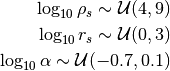
where the units are  and
and  for and respectively.
To setup this model, we can write out our configuration in a yaml file. For the purposes of using modds, you can think of this as a python dictionary in file form.
output: mymodel.hdf5

model:
  profile: Einasto
  parameters:
  - rhos:
      prior: uniform(loc=4, scale=5)
      transform: from_log
  - rs:
      prior: uniform(loc=0, scale=3)
      transform: from_log
  - alpha:
      prior: norm(loc=-0.7, scale=0.1)
      transform: from_log
  quantity: deltaSigma
  observables: mydata.csv
  constants:
    z: 0.5
settings
  cosmo: planck15
  nwalkers: 64
  r_grid: 50
The first key specifies the name of the output file. If left unspecified, the output file name defaults to that of the input file, just with an hdf5 file extension. The second key, model, specifies the configuration of the model. In particular, we can choose our profile from any of those recognized by colossus.
The parameters of the model are specified as a list (hence the hyphens), as the order needs to be fixed. An individual free parameter needs to have its prior probability distribution specified with a string that can be interpreted as a scipy.stats continuous distribution. This format is simply the name of the distribution with parenthesis around the fixed hyper-parameters of the distribution. For most common distributions, these are a location (loc) and scale (scale) parameter. For a Gaussian distribution, this corresponds to the mean and standard deviation. For a uniform distribution, this corresponds to the lower bound and the difference between the lower and upper bounds. More details can be found in the scipy.stats documentation.
Parameters can also have an optional transform. The idea here is that the space on which we want to sample the model (e.g., the logarithm of the parameters in this example) is not necessarily the space in which we want to evaluate our physical models (i.e., colossus expects physical densities, not the logarithm of physical densities). Currently only a logarithmic transform is implemented, but users can construct parameters with transforms and inverse transforms by directly instantiating the Parameter class if need be.
If we wanted to keep one of the parameters in the model fixed, we would add that fixed value to a dictionary of constants. The redshift, z, should always be either a model parameter or a constant of the model.
The quantity key should specify what physical quantity is being modeled, and can be any quantity that a colossus.halo.profile_base.HaloDensityProfile instance can model, e.g., rho, sigma, M, DeltaSigma.
observables should either be a *.csv filename or a dictionary of arrays with keys of r, q, and q_err (radii, quantities, and observational uncertainty respectively). If a filename is passed, the file should be comma-delimited with rows of measurements and columns of (r, q, q_err).
The settings dictionary carries a few necessary settings. cosmo represent the adopted cosmology and should be a string recognized by colossus.cosmology.cosmology.setCosmology(). nwalkers is the number of parameter walkers used in the Goodman & Weare ensemble sampler. It should be an even integer, and at very least twice the number of free parameters. r_grid is the number of grid points for the stored posterior predicitive checks.
We can initialize an output file from this configuration with the init command, e.g. modds init mymodel.yaml. This will create the mymodel.hdf5 file. We can then sample from this model with modds sample mymodel.hdf5 1000 where the second argument to sample indicates that we will sample for 1000 iterations. We can optionally make use of multiple threads with the --threads argument, e.g. modds sample –threads 4 mymodel.hdf5 1000. You can both initialize and sample from the model with the run subcommand. A reminder of all of these subcommands can be found by calling help, e.g., modds -h.